Looking up a barcode in Python is a single HTTP request. Doing it for fifty thousand barcodes without getting rate-limited, burning your quota on codes you already know are missing, or silently writing empty rows into your database — that takes a bit more care.
This guide starts with the three-line version and builds up to something you'd be comfortable running against a real catalogue. Every snippet works as written. If you want the background on barcode formats first, see our guide to barcode types.
The three-line version
import requests

r = requests.get(
    "https://barcodereport.com/api/search_barcode",
    params={"barcode": "9780132350068"},
    headers={"X-API-Key": "YOUR_API_KEY"},
)
print(r.json())
{
  "barcode": "9780132350068",
  "old_barcode": "0132350068",
  "title": "Criminology",
  "authors": "Steven E. Barkan",
  "number_of_pages": "656",
  "publish_date": "March 13, 2008",
  "price_currency": "USD",
  "brand": null,
  "category": null,
  "image_url": null,
  "min_price": null
}
Flat JSON, one object, no envelope to unwrap. Fields we don't hold for that product come back as null.
Send the key in an X-API-Key header rather than a ?api_key= query parameter. Query strings end up in server logs, proxy logs and browser history. Authorization: Bearer YOUR_API_KEY works too.
Loading your key from the environment
Never commit a key. The pattern that costs nothing to adopt:
import os

API_KEY = os.environ["BARCODE_API_KEY"]     # raises immediately if unset
BASE_URL = "https://barcodereport.com/api"
export BARCODE_API_KEY="your_key_here"
Using os.environ[...] rather than .get() is deliberate: you want a loud failure at startup, not a confusing 401-shaped bug three functions deep.
A client that handles reality
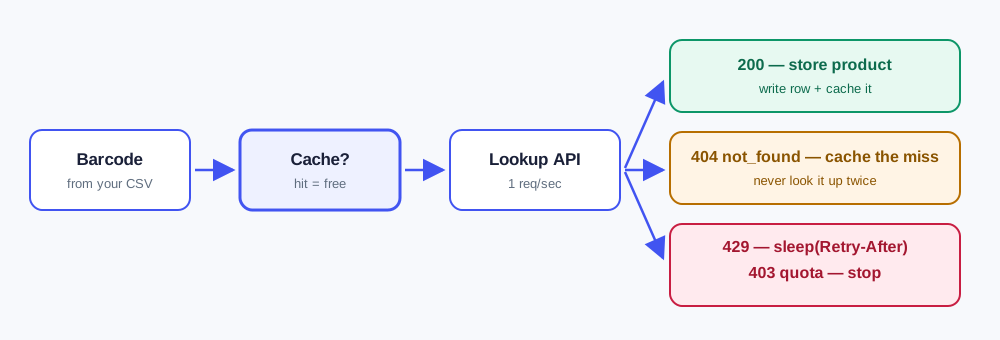
Four things will happen in production that the three-line version doesn't survive:
- Some barcodes won't be in the database.
- You'll exceed 60 requests per minute.
- Your monthly allowance will run out.
- The network will fail.
Each needs different handling, and the API tells you which is which through a machine-readable code field.
import os
import time
import requests

BASE_URL = "https://barcodereport.com/api"


class QuotaExceeded(Exception):
    """Monthly allowance is gone. Retrying will not help."""


class BarcodeClient:
    def __init__(self, api_key=None, timeout=10):
        self.api_key = api_key or os.environ["BARCODE_API_KEY"]
        self.timeout = timeout
        # A Session reuses the TCP connection, which matters a lot in a loop.
        self.session = requests.Session()
        self.session.headers.update({"X-API-Key": self.api_key})

    def lookup(self, barcode, max_retries=3):
        """Return a product dict, or None if the barcode isn't in the database."""
        barcode = "".join(ch for ch in str(barcode) if ch.isdigit())
        if not barcode:
            raise ValueError("Barcode must contain digits")

        for attempt in range(max_retries):
            try:
                r = self.session.get(
                    f"{BASE_URL}/search_barcode",
                    params={"barcode": barcode},
                    timeout=self.timeout,
                )
            except requests.RequestException:
                if attempt == max_retries - 1:
                    raise
                time.sleep(2 ** attempt)
                continue

            if r.status_code == 200:
                return r.json()

            body = r.json() if r.content else {}
            code = body.get("code")

            # A miss is a normal outcome, not an error.
            if code == "not_found":
                return None

            # Per-minute rate limit. The server tells us how long to wait.
            if code == "rate_limited":
                wait = int(r.headers.get("Retry-After", 60))
                time.sleep(wait)
                continue

            # Monthly allowance gone. Retrying will never succeed.
            if code == "quota_exceeded":
                raise QuotaExceeded(body.get("error"))

            if code == "invalid_key":
                raise PermissionError("API key rejected — check or rotate it")

            # 5xx: worth retrying with backoff.
            if r.status_code >= 500:
                if attempt == max_retries - 1:
                    r.raise_for_status()
                time.sleep(2 ** attempt)
                continue

            r.raise_for_status()

        return None
The distinction that catches people out: 429 is the per-minute rate limit, 403 quota_exceeded is your monthly allowance. They look similar and need opposite handling — one means "wait a moment and try again", the other means retrying is pointless until you upgrade or the cycle resets. Branch on code, never on the message text, which can be reworded.
Knowing your allowance before you start
Before processing a large batch, check what's left. This endpoint doesn't consume a request:
def account(self):
    r = self.session.get(f"{BASE_URL}/account", timeout=self.timeout)
    r.raise_for_status()
    return r.json()

info = client.account()
print(f"{info['usage_remaining']} of {info['plan_limit']} lookups left")
Successful lookups also carry X-Quota-Limit and X-Quota-Remaining headers, so you can track consumption as you go:
remaining = r.headers.get("X-Quota-Remaining")
if remaining is not None and int(remaining) < 100:
    logging.warning("Allowance nearly exhausted: %s left", remaining)
Caching: the single biggest saving
Product metadata for a barcode barely changes. Every repeat lookup is an allowance you didn't need to spend. A SQLite cache is about fifteen lines and will typically cut usage by an order of magnitude on real workloads:
import json
import sqlite3

class BarcodeCache:
    def __init__(self, path="barcodes.db"):
        self.conn = sqlite3.connect(path)
        self.conn.execute("""
            CREATE TABLE IF NOT EXISTS lookups (
                barcode TEXT PRIMARY KEY,
                payload TEXT,           -- JSON, or NULL for a known miss
                fetched_at TIMESTAMP DEFAULT CURRENT_TIMESTAMP
            )
        """)
        self.conn.commit()

    def get(self, barcode):
        row = self.conn.execute(
            "SELECT payload FROM lookups WHERE barcode = ?", (barcode,)
        ).fetchone()
        if row is None:
            return "MISSING"                      # never looked up
        return json.loads(row[0]) if row[0] else None   # None = known miss

    def put(self, barcode, product):
        self.conn.execute(
            "INSERT OR REPLACE INTO lookups (barcode, payload) VALUES (?, ?)",
            (barcode, json.dumps(product) if product else None),
        )
        self.conn.commit()
Note that misses are cached too, as a NULL payload. Re-querying a barcode you already know isn't there still costs a request, because the search runs either way. On a catalogue with a lot of obscure codes this is a large share of the waste.
Processing a CSV of thousands of barcodes
The pattern most people actually need — read a file, look up what isn't cached, stay inside the rate limit, write results, and be safe to re-run after a crash:
import csv
import logging
import time

from barcode_client import BarcodeClient, QuotaExceeded
from cache import BarcodeCache

logging.basicConfig(level=logging.INFO)

RATE_LIMIT_PER_MIN = 60
MIN_INTERVAL = 60 / RATE_LIMIT_PER_MIN     # ~1 request/second, stays under the limit


def enrich(infile, outfile):
    client, cache = BarcodeClient(), BarcodeCache()
    stats = {"cached": 0, "found": 0, "missing": 0}

    with open(infile, newline="") as f_in, open(outfile, "w", newline="") as f_out:
        writer = csv.DictWriter(
            f_out, fieldnames=["barcode", "title", "brand", "category", "image_url"]
        )
        writer.writeheader()

        for row in csv.DictReader(f_in):
            barcode = "".join(ch for ch in row["barcode"] if ch.isdigit())
            if not barcode:
                continue

            product = cache.get(barcode)

            if product == "MISSING":               # not cached — call the API
                started = time.monotonic()
                try:
                    product = client.lookup(barcode)
                except QuotaExceeded:
                    logging.error("Allowance exhausted — stopping at %s", barcode)
                    break                          # cache keeps everything so far
                cache.put(barcode, product)
                # Self-throttle so we never trip the rate limit.
                time.sleep(max(0, MIN_INTERVAL - (time.monotonic() - started)))
            else:
                stats["cached"] += 1

            if product:
                stats["found"] += 1
                writer.writerow({
                    "barcode": barcode,
                    "title": product.get("title") or "",
                    "brand": product.get("brand") or "",
                    "category": product.get("category") or "",
                    "image_url": product.get("image_url") or "",
                })
            else:
                stats["missing"] += 1

    total = stats["found"] + stats["missing"]
    rate = (stats["found"] / total * 100) if total else 0
    logging.info("Done: %s found, %s missing (%.1f%% match), %s from cache",
                 stats["found"], stats["missing"], rate, stats["cached"])


if __name__ == "__main__":
    enrich("input.csv", "enriched.csv")
Three things worth pointing out:
- It's re-runnable. Everything already looked up is in the cache, so a crash or a quota stop costs you nothing on the next run.
-
It self-throttles to stay under 60 requests a minute rather than reacting to
429s after the fact. - It reports a match rate, which is the number that actually tells you whether a data source fits your catalogue.
If you're processing tens of thousands of codes as a one-off rather than building an ongoing integration, a bulk CSV lookup is usually simpler than writing a script at all — you upload the file and get results back.
ISBNs are a special case, handled for you
Books have two identifiers: the old 10-digit ISBN and the current 13-digit one. You don't need to convert between them — a lookup matches on both the current barcode and the superseded one, so 0132350068 and 9780132350068 return the same record. Book records also carry authors, number_of_pages and publish_date. There's more detail in our ISBN lookup guide.
Reading barcodes from images
Worth clearing up a common confusion: decoding a barcode from an image and looking up what it identifies are separate jobs. To decode, use pyzbar (a Python wrapper around ZBar):
from pyzbar.pyzbar import decode
from PIL import Image

for symbol in decode(Image.open("shelf-photo.jpg")):
    number = symbol.data.decode()
    product = client.lookup(number)
    print(number, "->", product["title"] if product else "not found")
pyzbar gives you the digits. The lookup turns those digits into a product. You need both.
Expect nulls, and design for them
The single most common mistake is assuming every field is populated. It isn't. Coverage is deepest on title; brand, category, image_url and min_price are present on a smaller share of records.
# Fragile — raises or writes "None" into your database.
name = product["brand"] + " " + product["title"]

# Fine.
name = " ".join(filter(None, [product.get("brand"), product.get("title")]))
Treat barcode and title as reliably present and everything else as a bonus, and run a sample of your own codes to measure the real match rate before you build on top of it.
Frequently asked questions
Send a GET request to a barcode lookup API with the requests library, passing the code as a barcode parameter and your key in an X-API-Key header. Against the Barcode Report API the endpoint is https://barcodereport.com/api/search_barcode and the response is a flat JSON object with title, brand, category, image and price where available. The full snippet is at the top of this guide.
Barcode Report's free plan includes 100 lookups a month at no cost and no card is required, which is enough to test an integration on your own barcodes. Paid plans start at 10,000 lookups a month when you need production volume.
A 429 with code rate_limited means you exceeded 60 requests per minute — wait for the number of seconds in the Retry-After header and continue. A 403 with code quota_exceeded means your monthly allowance is used up, and retrying will not succeed until the cycle resets or you upgrade. They need opposite handling, so branch on the code field rather than the status alone.
Self-throttle to roughly one request per second to stay under the 60-per-minute limit, cache every result including misses so re-runs cost nothing, and check your remaining allowance with the account endpoint before starting. For large one-off jobs a bulk CSV upload is usually simpler than scripting it.
Yes, but that is a separate step from looking it up. Use pyzbar to decode the barcode in the image into a number, then pass that number to a lookup API to get the product data. Decoding tells you what the code says; the lookup tells you what it identifies.
Because we do not hold every field for every product. Coverage is deepest on the product title and thinner on brand, category, image and price. Write your code so any field except barcode and title may be null, and measure the real match rate against a sample of your own barcodes before building on it.
Next steps
The client above — session reuse, error codes, backoff, and a cache that makes re-runs free — is most of what a production barcode integration needs. Everything after that is your own data model.
- Get an API key — 100 lookups a month included, no card required
- API reference — full field list and error codes
- Barcode API guide — how lookup and generation APIs differ
- Generate test barcodes — for testing your decoder