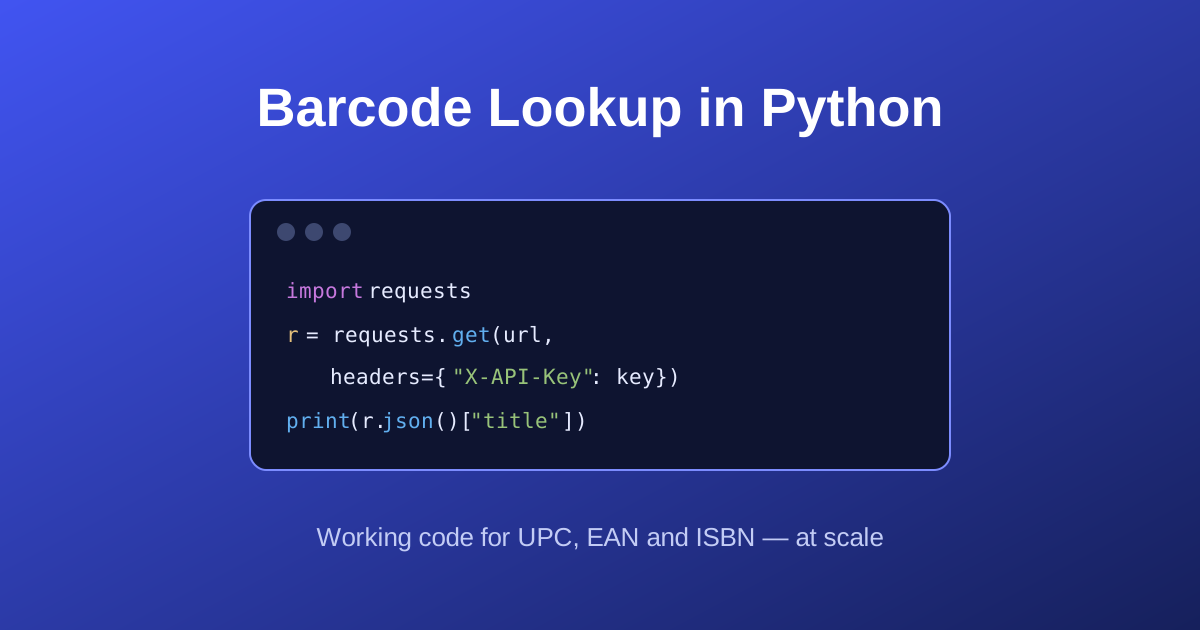
Building a barcode scanner app looks like one problem and is actually two. Reading the barcode off the camera is the part everyone starts with — and it's the part that's largely solved. Turning the number you just read into something a user recognises, like "Clean Code, Robert C. Martin, 431 pages", is the part that decides whether your app is useful.
This guide covers both, with code you can run. If you're still deciding which symbologies to support, our guide to barcode types is worth reading first.
What a scanner app actually does
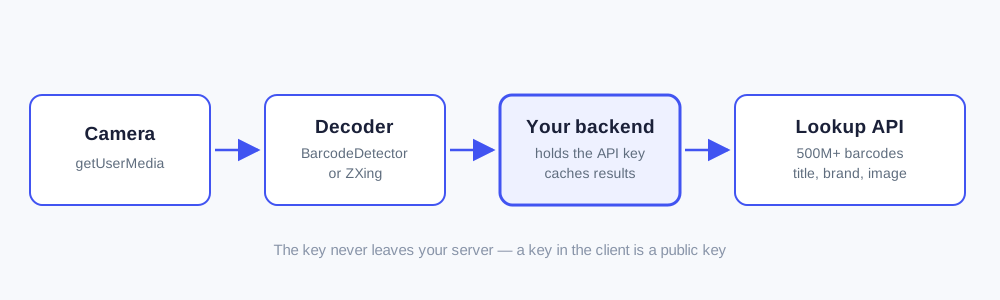
Four steps, and only the first two are about scanning:
- Capture a video stream from the device camera.
- Decode any barcode in the frame into a number.
- Look up that number to get product data.
- Display the result — or handle the fact that nothing was found.
Step 3 is where most projects stall. A UPC on its own is meaningless to a user; 747062088118 tells them nothing. You need a database behind it.
Step 1 and 2: reading the barcode
The built-in way: the BarcodeDetector API
Chromium-based browsers ship a native barcode decoder. No library, no WASM bundle, and it runs on the GPU where available:
// Check support before doing anything else.
if (!('BarcodeDetector' in window)) {
  // Fall back to a library — see the next section.
}

const detector = new BarcodeDetector({
  formats: ['upc_a', 'upc_e', 'ean_13', 'ean_8', 'code_128', 'code_39', 'itf']
});

const video = document.querySelector('video');
const stream = await navigator.mediaDevices.getUserMedia({
  video: { facingMode: 'environment' }   // rear camera on phones
});
video.srcObject = stream;
await video.play();

async function scanLoop() {
  try {
    const barcodes = await detector.detect(video);
    if (barcodes.length > 0) {
      onScan(barcodes[0].rawValue);   // e.g. "747062088118"
      return;                          // stop after the first hit
    }
  } catch (err) {
    console.error('Detection failed', err);
  }
  requestAnimationFrame(scanLoop);
}

scanLoop();
getUserMedia only works on a secure origin. That means HTTPS, or localhost during development. On a phone plugged into your laptop this catches almost everyone at least once.
Browser support, honestly
BarcodeDetector is available in Chromium browsers — Chrome, Edge, and Android WebView. Safari and Firefox do not support it, so on iOS you need a fallback. Since iOS is a large share of consumer scanning, treat the fallback as required rather than optional.
The fallback: ZXing
@zxing/browser is a maintained JavaScript port of the ZXing decoding library and works everywhere:
import { BrowserMultiFormatReader } from '@zxing/browser';

const reader = new BrowserMultiFormatReader();

reader.decodeFromConstraints(
  { video: { facingMode: 'environment' } },
  document.querySelector('video'),
  (result, err, controls) => {
    if (result) {
      controls.stop();
      onScan(result.getText());
    }
  }
);
A pragmatic pattern is to use the native detector when it exists and lazy-load ZXing only when it doesn't, so Chrome users never download the library.
Ask for facingMode: 'environment' rather than a specific deviceId. Device IDs change between sessions and differ across phones; environment reliably gets you the rear camera, which is the one people scan with.
Things that make scanning feel good
- Scan continuously, don't make people press a button. Run the detect loop on every frame and fire as soon as you get a hit.
-
Give immediate feedback. A short vibration via
navigator.vibrate(50)and a visual flash tell the user the scan registered, before the lookup has returned. - Debounce repeats. The same code will decode many times a second. Ignore a repeat of the last value for a second or two.
- Handle bad light. Offer a torch toggle where supported — most failed scans are lighting, not decoding.
Step 3: turning the number into a product
Now the important part. You have 9780132350068. Your user wants a title.
Do not put your API key in the browser
This is the mistake to avoid, and it's worth being blunt about: anything in your JavaScript bundle is public. A key shipped to the browser can be read from DevTools in about ten seconds, and then someone else is spending your quota.
Route the lookup through your own backend instead. Your app calls your server; your server calls the barcode API with the key.
There's a second, practical reason: the Barcode Report API does not send CORS headers, so a browser fetch() from your own domain would be blocked anyway. This is deliberate — it makes it hard to build the insecure version by accident.
A minimal backend proxy
import express from 'express';

const app = express();
const API_KEY = process.env.BARCODE_API_KEY;   // never hard-code this

app.get('/api/scan/:barcode', async (req, res) => {
  const barcode = req.params.barcode.replace(/\D/g, '');
  if (!barcode) return res.status(400).json({ error: 'Invalid barcode' });

  const response = await fetch(
    `https://barcodereport.com/api/search_barcode?barcode=${barcode}`,
    { headers: { 'X-API-Key': API_KEY } }
  );

  const data = await response.json();

  if (response.ok) {
    // Send the client only what it needs to render.
    return res.json({
      found: true,
      barcode: data.barcode,
      title: data.title,
      brand: data.brand,
      image: data.image_url
    });
  }

  if (data.code === 'not_found') {
    return res.status(404).json({ found: false });
  }

  // Log the real reason, tell the user something useful.
  console.error('Lookup failed:', data.code, data.error);
  return res.status(502).json({ error: 'Lookup unavailable' });
});

app.listen(3000);
Handle the errors that will actually happen
Every error response carries a stable code field. Branch on code, never on the message text — wording can change, codes don't:
| Status | code |
What to do |
|---|---|---|
| 404 | not_found |
Show "not in our database" and offer manual entry |
| 429 | rate_limited |
Back off for the Retry-After seconds |
| 403 | quota_exceeded |
Alert yourself — your users can't fix this |
| 403 | invalid_key |
Your key is wrong or was rotated |
A 429 and a 403 quota_exceeded are different problems. 429 is the per-minute rate limit — wait and retry. quota_exceeded means your monthly allowance is gone and retrying will never work. Scanner apps generate bursts, so handle 429 properly from day one.
Cache aggressively
Product metadata for a given barcode barely changes. Cache every successful lookup — in Redis, in your own database, anywhere — and serve repeats locally. In a retail or warehouse setting where staff scan the same SKUs all day, this is the difference between a few hundred API calls a day and a few hundred thousand.
Cache the misses too, with a shorter expiry. Re-querying a barcode you already know isn't there wastes an allowance, because a lookup that finds nothing still costs a request.
Step 4: designing for the miss
No barcode database covers every product on earth, and pretending otherwise makes for a bad app. Plan for three outcomes, not one:
You get a title, brand, image and category. Render it and move on.
You get a title but no image or brand — this is common. Design your card so it still looks intentional with only a title. Don't leave an empty image box.
Show the barcode you scanned, confirm it was read correctly, and let the user type the details in. If your app is for inventory, saving their entry locally turns a dead end into your own private catalogue.
Test the "partial match" path deliberately. It's the most common real-world result and the one most likely to look broken.
Testing without a shelf of products
You don't need physical items. Our barcode generator creates valid UPC-A, EAN-13, Code 128 and ISBN barcodes as PNG or SVG — generate a sheet, display it on a second screen, and scan that. It's also the fastest way to test symbologies you don't have to hand, like ITF-14 or Codabar.
For a code that returns real data, try 9780132350068 — a book record with author, page count and publication date.
Choosing a lookup API
Whatever you use for step 3, judge it on:
- Coverage of your products. Not the headline row count — the share of your catalogue it can find. Run 30 of your own barcodes before committing to anything.
- Latency. A scanner app feels broken above roughly 300ms end to end. Check the API's own response time, then add your network hop.
-
Honest error semantics. Machine-readable codes and a
Retry-Afterheader, so you can write correct retry logic instead of guessing. - A free tier big enough to prototype on.
The Barcode Report API covers over 500 million UPC, EAN, GTIN and ISBN codes, typically responds in under 10 milliseconds, and the free plan includes 100 lookups a month at no cost — enough to test a scanner app on real products before you pay anything. Responses include X-Quota-Limit and X-Quota-Remaining headers so you always know where you stand. The API reference has the full field list.
Coverage is deepest on product title; brand, image and price are present on a smaller share of records. That's worth knowing before you design a UI that assumes an image will always be there.
Frequently asked questions
For the scanning step, the native BarcodeDetector API on Chromium and ZXing as a fallback covers essentially every device without a paid SDK. For the lookup step you need a product database — judge candidates on coverage of your own barcodes, response time, and whether errors are machine-readable. Always call the lookup API from your backend rather than the app itself.
Yes. navigator.mediaDevices.getUserMedia plus either the BarcodeDetector API or a JavaScript decoder such as ZXing runs entirely in the browser. It must be served over HTTPS. Chromium browsers support BarcodeDetector natively; Safari and Firefox need the library fallback.
Almost always because you're relying on the BarcodeDetector API, which Safari does not implement. Detect support with 'BarcodeDetector' in window and lazy-load a JavaScript decoder such as @zxing/browser when it's missing.
No. Anything shipped to a client can be extracted, including from a compiled mobile binary. Keep the key on a server you control and have your app call your own endpoint, which then calls the barcode API. This also lets you cache results and add your own rate limiting.
Send the decoded number to a product lookup API from your backend. With the Barcode Report API that is a single GET request to /api/search_barcode with your key in an X-API-Key header, returning a flat JSON object with title, brand, category, image and price where available.
Show the scanned number so the user can confirm it read correctly, then let them enter the details manually. Cache that entry locally so the same scan resolves instantly next time. Treat a miss as a normal outcome rather than an error state — no database covers every product.
Where to go next
The scanning half of a barcode scanner app is a solved problem you can build in an afternoon. The half that determines whether anyone keeps using it is what happens after the beep — how fast the product data comes back, how often it's there at all, and how gracefully you handle it when it isn't.
- Get an API key — 100 lookups a month included, no card required
- Read the API reference
- Generate test barcodes
- Bulk barcode lookup — for seeding a catalogue before launch