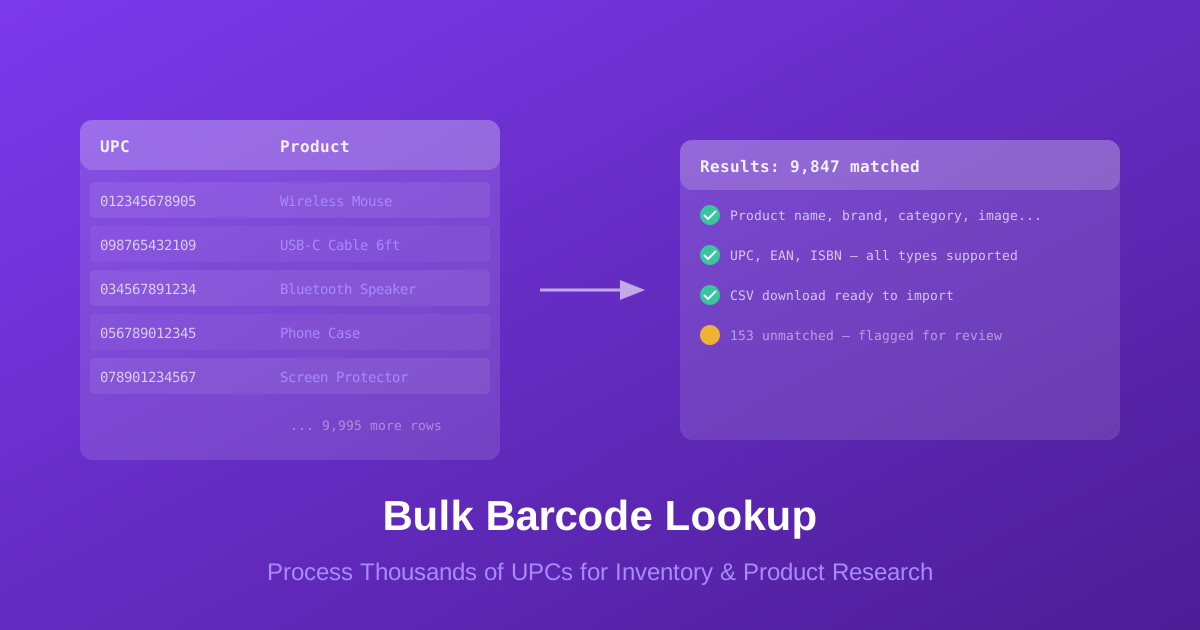
Bulk barcode lookup is the process of submitting hundreds, thousands, or even tens of thousands of barcode numbers at once and receiving structured product data for each one. Instead of searching barcodes one at a time, you upload a file and get back a spreadsheet of results — product names, brands, categories, images, and more.
If you've ever needed to identify the contents of a warehouse pallet, catalog a shipment of mixed inventory, or enrich product listings across an e-commerce store, you already know why single lookups don't scale. Manual barcode searches work for a handful of products. For anything beyond that, you need bulk processing.
This guide covers how bulk barcode lookup works, who uses it, how to prepare your data, and how BarcodeReport.com makes it possible to process any volume of UPC, EAN, and ISBN codes without a subscription or monthly commitment.
What Is Bulk Barcode Lookup?
Bulk barcode lookup takes the same process as a single barcode search and scales it to handle large volumes. You provide a list of barcodes — UPC, EAN, ISBN, or any combination — and a database returns the matched product data for each one.
The core workflow is simple:
- Prepare a file with one barcode per row (CSV, Excel, or text)
- Upload the file to a bulk lookup service
- Receive results with product data for every matched barcode
- Import the enriched data into your inventory system, e-commerce platform, or spreadsheet
The difference between bulk lookup and an API integration is important. Bulk lookup is a batch process — you submit a file and receive results hours later. An API returns data in real-time, one barcode at a time, for automated systems. Both serve different needs, and many businesses use both depending on the situation.
| Feature | Single Lookup | Bulk Lookup | API |
|---|---|---|---|
| Volume | 1-10 barcodes | 100-100,000+ | Unlimited |
| Speed | Instant | 24-48 hours | Real-time |
| Technical skill | None | None | Developer needed |
| Best for | Quick checks | Batch projects | Automated systems |
| Cost | Free | Per matched barcode | Subscription |
BarcodeReport handles UPC, EAN, and ISBN codes in the same bulk upload. If your inventory includes books alongside consumer products, you don't need separate services — upload everything in one file.
Who Uses Bulk Barcode Lookup?
Bulk barcode lookup serves anyone who handles physical products at scale. The specific use cases vary by industry, but the core need is the same: turn a list of barcode numbers into actionable product data.
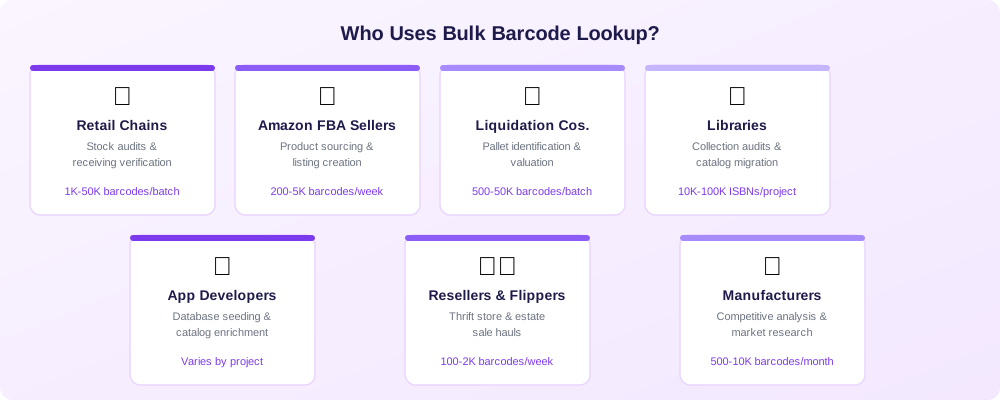
Retail Chains and Warehouses
The challenge: Receiving shipments with hundreds of SKUs, conducting inventory audits across multiple locations, or onboarding new product lines into a POS system.
How bulk lookup helps: Scan all barcodes during receiving, export them to a CSV, and upload to BarcodeReport's bulk lookup. The returned data fills in product names, brands, categories, and descriptions — ready to import into your inventory management system.
Typical volume: 1,000-50,000 barcodes per batch during major audits. Smaller weekly batches of 100-500 for ongoing receiving.
Amazon FBA and E-commerce Sellers
The challenge: Sourcing products from wholesale lots, thrift stores, estate sales, or retail arbitrage. Each product needs identification, valuation, and listing data before it can be sold.
How bulk lookup helps: Scan every product in a haul, upload the barcodes, and receive complete product data including names, brands, and categories. Use this data to create accurate marketplace listings and estimate resale value.
Typical volume: 200-5,000 barcodes per week for active sellers. Larger batches of 10,000+ for wholesale lot evaluation.
Liquidation and Overstock Companies
The challenge: Evaluating pallets or truckloads of mixed merchandise. The inventory could contain anything — electronics, groceries, toys, health products — all with barcodes that need identification and valuation.
How bulk lookup helps: Extract barcodes from scanning equipment, upload the full list to bulk lookup, and receive product data for the entire lot. This tells you exactly what's in the pallet and helps you price it accurately.
Typical volume: 500-50,000 barcodes per batch. Often processing multiple pallets per week.
Libraries and Academic Institutions
The challenge: Cataloging collections, migrating between library management systems, or auditing holdings. Each book needs accurate metadata — title, author, publisher, ISBN, edition.
How bulk lookup helps: Export ISBNs from your catalog, run them through bulk lookup, and cross-reference returned data against your existing records. Fill in missing fields and catch metadata errors. For deep dive into book-specific lookups, see our ISBN database lookup guide.
Typical volume: 10,000-100,000+ ISBNs during migrations or major audits.
App Developers and Product Data Companies
The challenge: Building or maintaining product databases, barcode scanning apps, or catalog systems that need comprehensive product information.
How bulk lookup helps: Seed your database with product data by uploading barcode lists. Use bulk lookup for initial data population and the API for ongoing real-time lookups as users scan products.
Typical volume: Varies widely — from initial database seeds of 100,000+ barcodes to periodic enrichment batches.
Resellers and Product Flippers
The challenge: Evaluating thrift store hauls, garage sale finds, or wholesale lots. You need to quickly identify what you've bought and determine if it's worth listing.
How bulk lookup helps: Scan everything, upload the barcodes, and get product data back. Sort by brand, category, or any other field to prioritize which items to list first.
Typical volume: 100-2,000 barcodes per week.
Manufacturers and Brand Owners
The challenge: Monitoring how your products appear in databases, verifying competitor product data, or conducting market research across product categories.
How bulk lookup helps: Upload competitor UPCs to see their product data, categories, and how they're described. Upload your own UPCs to verify your products appear correctly in barcode databases.
Typical volume: 500-10,000 barcodes per research project.
How to Do a Bulk Barcode Lookup with BarcodeReport
Here's the step-by-step process for processing barcodes in bulk using BarcodeReport.com.
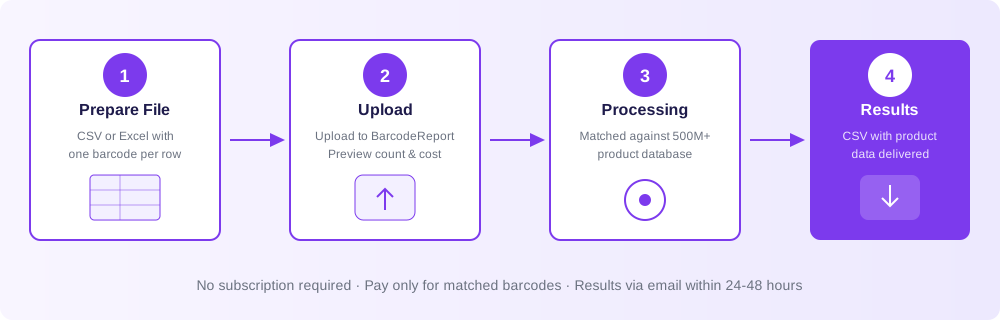
Step 1: Prepare Your Barcode File
Create a CSV, Excel (.xlsx), or plain text (.txt) file with one barcode per row. No headers required, though they won't cause issues if included.
012345678905
098765432109
9780132350884
4006381333931
8801234567891
034000004904
021130126026
Preparation tips:
- Mix barcode types freely — UPC (12-digit), EAN (13-digit), and ISBN (10 or 13-digit) codes can all go in the same file
- Remove duplicates before uploading to avoid paying twice for the same product
- Format as Text in Excel — Excel may strip leading zeros from UPCs starting with 0 (e.g., turning 012345678905 into 12345678905). Format the column as Text first
- One barcode per row — no need for additional columns, though extra columns won't break anything
- No size limit on the file — BarcodeReport accepts up to 100,000 barcodes per upload
Excel's most common trap: it converts long numbers to scientific notation (e.g., 9.78E+12) or drops leading zeros. Format your barcode column as Text before pasting values, or prefix each number with an apostrophe ('012345678905). Better yet, use a plain CSV file edited in a text editor.
Step 2: Upload to BarcodeReport
Visit BarcodeReport.com/bulk-lookup and upload your file. The system will:
- Detect and validate each barcode in your file
- Show the total count and barcode type breakdown (UPC, EAN, ISBN)
- Display the estimated cost before you confirm
- Process only after you approve
No account deposit, subscription, or monthly commitment required. You pay $0.10 per barcode that returns a successful match. Unmatched barcodes are free.
Step 3: Wait for Processing
Results are delivered via email, typically within 24-48 hours. Smaller batches (under 1,000 barcodes) often complete faster. The system matches your barcodes against a database of over 500 million products spanning:
- Consumer packaged goods (food, beverages, household)
- Electronics and accessories
- Health and beauty products
- Books (via ISBN)
- Toys and games
- Clothing and apparel
- Industrial and office products
Step 4: Download and Use Your Results
Your results arrive as a CSV file with one row per barcode. Each row includes:
| Field | Description | Example |
|---|---|---|
| Barcode | Original barcode from your file | 012345678905 |
| Product name | Full product title | Logitech M510 Wireless Mouse |
| Brand | Manufacturer or brand name | Logitech |
| Category | Product classification | Electronics > Computer Accessories |
| Description | Product description (when available) | Full-size wireless mouse with... |
| Image URL | Link to product image | https://... |
| Match status | Whether the barcode was found | matched / unmatched |
Unmatched barcodes appear in the results with empty fields and an "unmatched" status, so you know exactly which products need manual attention.
Step 5: Import Into Your System
The CSV output is ready to import into virtually any system:
- Amazon Seller Central — Flat file product listings
- Shopify — Product CSV import
- WooCommerce — WP All Import or native CSV upload
- eBay — File Exchange or Seller Hub bulk listing
- Google Sheets / Excel — Analysis, pricing, and decision-making
- Inventory systems (TradeGecko, Cin7, inFlow) — Stock catalog enrichment
- Library systems (Koha, Evergreen) — Collection metadata updates
If you need to process barcodes on an ongoing basis rather than one-time batches, the BarcodeReport API may be a better fit. It provides real-time lookups that integrate directly into your scanning workflow or application.
Bulk Lookup vs. API: When to Use Each
Both bulk lookup and API access serve the same fundamental purpose — turning barcodes into product data. The right choice depends on your volume, frequency, and technical resources.
Use Bulk Lookup When:
- You have a one-time or periodic batch of barcodes to process
- You don't have developer resources to build an API integration
- You need to catalog existing inventory or evaluate a new acquisition
- Speed isn't critical — you can wait 24-48 hours for results
- You want zero technical setup
Use the API When:
- You need real-time barcode lookup (e.g., scanning apps, POS systems)
- You process barcodes continuously as part of an automated workflow
- You're building a product that includes barcode scanning features
- You need responses in milliseconds, not hours
Use Both When:
- You have a large initial backlog (bulk) plus ongoing daily scanning (API)
- You're migrating systems (bulk for the historical catalog, API for new entries)
- You do periodic audits (bulk) alongside real-time operations (API)
| Scenario | Best Method | Why |
|---|---|---|
| Catalog 5,000 products in a warehouse | Bulk lookup | One-time batch, no coding |
| Scan items at a retail checkout | API | Instant response required |
| Evaluate a liquidation pallet | Bulk lookup | Large batch, no urgency |
| Daily new product intake (20-50/day) | Either | Bulk for simplicity, API for speed |
| Mobile scanning app | API | Real-time responses for users |
| Monthly inventory reconciliation | Bulk lookup | Recurring batch, scheduled workflow |
| E-commerce listing automation | API | Integrated into listing flow |
What Match Rates to Expect
Not every barcode will return a match. Match rates depend on the product type, age, and origin.
Match Rates by Product Category
| Product Category | Expected Match Rate | Notes |
|---|---|---|
| Major brand consumer goods (US) | 90-98% | Highest match rates — well-cataloged |
| Electronics and accessories | 85-95% | Strong coverage, some niche items miss |
| Food and beverages (US) | 90-97% | Excellent coverage for retail products |
| Health and beauty | 85-95% | Good coverage, some specialty items vary |
| Books (ISBN, post-2000) | 85-95% | Strong match rates for major publishers |
| International products (EAN) | 70-90% | Varies by country of origin |
| Private label / store brands | 60-80% | Less consistently cataloged |
| Very old or discontinued products | 40-70% | Products from before digital catalogs |
| Industrial / B2B products | 50-75% | Less coverage than consumer goods |
Improving Your Match Rate
If your initial match rate is lower than expected, try these approaches:
- Verify barcode accuracy: Scan errors are the most common cause of no-match results. Re-scan any barcodes that didn't match.
- Check for leading zeros: UPCs starting with 0 may have been truncated by Excel. Ensure all 12 digits are present.
- Try both formats: If you have 12-digit UPCs that don't match, try adding a leading zero to search as EAN-13.
- Remove check digit errors: Use an online barcode validator to confirm your barcodes are structurally valid before uploading.
- Split by source: If your inventory comes from multiple sources (US retail, international imports, etc.), processing them separately helps you understand match rates by source.
BarcodeReport's database includes over 500 million products. For US consumer goods from major brands, expect match rates above 90%. For mixed international inventory, 75-85% is typical. Run a small test batch of 50-100 barcodes first to gauge results for your specific mix.
Common Bulk Lookup Challenges (and How to Solve Them)
Excel Destroys Leading Zeros
Problem: You paste UPCs into Excel and 012345678905 becomes 12345678905. That 11-digit number won't match anything.
Solution: Format the column as Text before entering data. Or use a plain text editor (Notepad, VS Code) to create your CSV. If the damage is already done, prepend a 0 to any 11-digit numbers in your file.
Scientific Notation in Spreadsheets
Problem: Long barcodes display as 9.78E+12 in Excel. The underlying value may or may not be correct.
Solution: Format cells as Text, then re-enter the values. Or use Google Sheets, which handles long numbers more gracefully. Best approach: save as CSV from a text editor.
Duplicate Barcodes Inflate Cost
Problem: Your file contains the same barcode multiple times (common when exporting from scanning equipment that records each scan).
Solution: Deduplicate before uploading. In Excel, use Remove Duplicates. In Google Sheets, use =UNIQUE(). In a terminal: sort barcode-list.csv | uniq > clean-list.csv
Mixed Barcode Formats in One File
Problem: Your file contains a mix of UPC-A (12 digits), EAN-13 (13 digits), ISBN-10, ISBN-13, and maybe some internal SKU numbers that aren't real barcodes.
Solution: BarcodeReport handles all standard barcode formats in a single upload — no need to separate them. Internal SKUs or invalid numbers will simply return as unmatched (and won't be charged). Upload everything and let the system sort it out.
Unmatched Barcodes Need Identification
Problem: You got your results back and 15% of barcodes didn't match. You still need to identify those products.
Solution: For unmatched barcodes, try a single lookup to see if partial data is available. Check if the barcode is valid using an online check digit calculator. For products with no database match, manual identification (reading the label, searching by product name) may be necessary. Consider submitting the barcode data to help build the database for others.
Pricing: How Bulk Lookup Costs Work
BarcodeReport's bulk lookup pricing is designed to be simple and commitment-free.
How It Works
- $0.10 per matched barcode — you only pay for barcodes that return product data
- Unmatched barcodes are free — no charge for barcodes that don't return results
- No subscription — no monthly fees, no minimum commitment
- No deposit — pay only after your results are ready
- No expiration — use the service whenever you need it
Cost Examples
| Batch Size | Estimated Matches (90%) | Cost |
|---|---|---|
| 100 barcodes | ~90 matches | ~$9.00 |
| 500 barcodes | ~450 matches | ~$45.00 |
| 1,000 barcodes | ~900 matches | ~$90.00 |
| 5,000 barcodes | ~4,500 matches | ~$450.00 |
| 10,000 barcodes | ~9,000 matches | ~$900.00 |
| 50,000 barcodes | ~45,000 matches | ~$4,500.00 |
Not sure what your match rate will be? Upload a test batch of 50-100 barcodes first. This gives you a real match rate for your specific inventory type, so you can estimate costs for a full batch accurately.
Bulk Lookup vs. API Pricing
For ongoing, high-volume needs, an API subscription may be more cost-effective than repeated bulk uploads.
| Method | Pricing Model | Best For |
|---|---|---|
| Bulk lookup | $0.10 per match, no subscription | One-time or periodic batches |
| API | Monthly subscription plans | Ongoing automated lookups |
Visit the API pricing page to compare plans for your expected volume.
Frequently Asked Questions
All major formats: UPC-A (12-digit), UPC-E (8-digit), EAN-13 (13-digit), EAN-8 (8-digit), ISBN-10, and ISBN-13. You can mix all formats in a single upload file.
Up to 100,000 barcodes per file. For larger projects, split into multiple batches. There is no limit on how many batches you can submit.
Most jobs complete within 24-48 hours. Smaller batches under 1,000 barcodes often return within a few hours. Results are delivered via email as a CSV file.
You only pay for barcodes that return a successful product match. Unmatched barcodes appear in your results with empty fields and are not charged.
Yes. BarcodeReport processes all barcode types in a single upload, so you can include consumer products (UPC/EAN) and books (ISBN) together.
CSV (.csv), Excel (.xlsx), and plain text (.txt). One barcode per row, no headers required. CSV is recommended to avoid Excel formatting issues.
Accuracy is high for major brand consumer goods. For niche, international, or very old products, some fields may be incomplete. We recommend spot-checking a sample of results against physical products.
There is no subscription, deposit, or monthly minimum. BarcodeReport bulk lookup is entirely pay-per-use. You only pay for matched results when you submit a batch.
Yes. The CSV output includes product names, brands, categories, and descriptions ready to import into Amazon Seller Central, eBay File Exchange, Shopify, or any platform that accepts CSV product data.
Use the BarcodeReport API for real-time lookups. It returns product data in milliseconds and integrates into scanning apps, POS systems, and automated workflows.
Related Reading
- The Complete Guide to Barcode Lookup — How barcode lookup works for single searches and getting started
- ISBN Database Lookup: Find Book Data at Scale — Deep dive into book-specific bulk lookup workflows
- The Ultimate Guide to UPC Lookup — Understanding UPC barcode structure and how to search them
Conclusion
Bulk barcode lookup turns the tedious work of identifying products one by one into a scalable, automated process. Whether you're cataloging a warehouse, evaluating a liquidation pallet, enriching e-commerce listings, or building a product database, processing barcodes in bulk saves hours of manual work and reduces errors.
Key takeaways:
- Bulk lookup processes hundreds to 100,000+ barcodes per batch — UPC, EAN, and ISBN together
- No subscription, no deposit — pay $0.10 per matched barcode only
- Results include product name, brand, category, description, and image URL
- Expect 85-95% match rates for major US consumer brands, lower for international or niche products
- Use bulk lookup for batch projects, the API for real-time automated systems
- CSV results import directly into Amazon, Shopify, eBay, inventory systems, and spreadsheets
The right approach depends on your volume and workflow. One-time projects and periodic audits fit bulk lookup perfectly. Ongoing automated needs call for an API integration. Many businesses use both.
Ready to process barcodes in bulk?
- Upload your barcode file — $0.10 per match, no subscription
- Search a single barcode — free, instant results
- Explore the API — real-time lookup for automated systems