
ISBN database lookup is the process of querying a database with an International Standard Book Number to retrieve detailed information about a book — title, author, publisher, publication date, cover image, page count, binding type, and more. Whether you need data for one book or one hundred thousand, ISBN lookup is the foundation of every book-related business workflow, from used bookselling to library cataloging to building reading apps.
Every published book has at least one ISBN. That 10- or 13-digit number is more than a barcode — it's a key that unlocks a structured record of everything the publishing industry knows about that title. If you're new to barcode lookup in general, ISBNs follow the same principles but with richer, more standardized data. The challenge is accessing that data reliably, affordably, and at the volume your business requires.
This guide covers how ISBN database lookup works, what data you can expect, how to choose between API and bulk approaches, and how BarcodeReport.com helps businesses process ISBNs at any scale.
What Is an ISBN and Why Does It Matter?
An ISBN (International Standard Book Number) is a unique numeric identifier assigned to every edition and variation of a published book. The system has been in use since 1970 and is managed globally by the International ISBN Agency.
There are two formats:
- ISBN-10: The original format, 10 digits. Used for books published before 2007.
- ISBN-13: The current standard, 13 digits. Begins with prefix 978 or 979. Every ISBN-10 has an ISBN-13 equivalent.
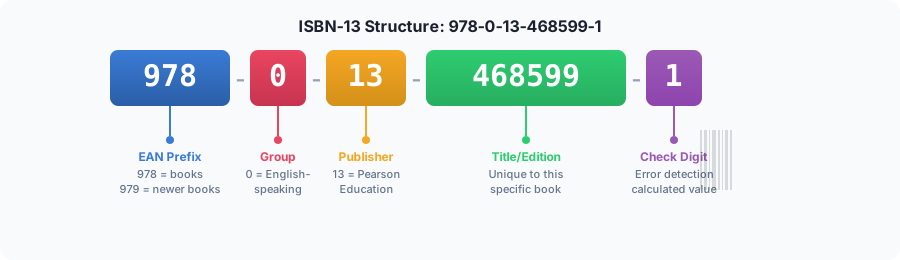
ISBNs encode specific meaning in their structure:
| Segment | Purpose | Example (978-0-13-468599-1) |
|---|---|---|
| Prefix | EAN prefix (978 or 979) | 978 |
| Registration group | Country or language area | 0 (English-speaking) |
| Registrant | Publisher identifier | 13 (Pearson) |
| Publication | Specific title/edition | 468599 |
| Check digit | Error detection | 1 |
This structure means ISBNs are not random — they carry embedded information about where a book was published and by whom, even before you query a database.
ISBN vs. Other Book Identifiers
Books carry several identifiers beyond ISBNs. Understanding the differences helps you choose the right lookup approach.
| Identifier | Format | Coverage | Best For |
|---|---|---|---|
| ISBN-13 | 13 digits (978/979 prefix) | All books since 2007 | Universal book identification |
| ISBN-10 | 10 characters | Books before 2007 | Legacy systems, older catalogs |
| ASIN | 10 alphanumeric | Amazon listings only | Amazon marketplace operations |
| LCCN | Variable | US Library of Congress | Library and academic cataloging |
| OCLC Number | Variable | WorldCat member libraries | Interlibrary loan, catalog sharing |
| DOI | URL-like string | Academic publications | Scholarly research, journals |
ISBN is the only identifier that's universally assigned at publication, used across all retailers, and machine-readable as a barcode. That makes it the most practical lookup key for commercial book operations. For a deeper dive into how ISBN barcodes relate to UPC and EAN systems, see our guide on UPC vs EAN barcodes.
What Data Does ISBN Lookup Return?
When you query a database with an ISBN, the response typically includes a rich set of bibliographic and commercial data. The exact fields vary by provider, but here's what a comprehensive ISBN lookup returns.
Core Fields (Available for Most Books)
| Field | Description | Example |
|---|---|---|
| Title | Full book title with subtitle | "Clean Code: A Handbook of Agile Software Craftsmanship" |
| Author(s) | One or more authors | Robert C. Martin |
| Publisher | Publishing house | Pearson Education |
| Publication date | Year or full date | August 2008 |
| ISBN-10 | Legacy 10-digit ISBN | 0132350882 |
| ISBN-13 | Current 13-digit ISBN | 9780132350884 |
| Binding | Physical format | Paperback, Hardcover, Spiral-bound |
| Pages | Total page count | 464 |
| Language | Publication language | English |
| Cover image | URL to cover art | High-resolution JPEG or PNG |
Extended Fields (When Available)
- Synopsis/Description: Publisher-provided summary or back-cover text
- Subjects/Categories: BISAC subject codes, Dewey Decimal, or custom categories
- Dimensions: Height × width × depth in inches or centimeters
- Weight: Shipping weight
- Edition: Edition number and description
- MSRP/List price: Publisher-set retail price
- Format: Print, ebook, audiobook
- Series: Series name and volume number
Data Quality by Book Category
Not all books have equally complete records. Data availability depends on the publisher, the book's age, and the database's sources.
| Book Category | Data Completeness | Notes |
|---|---|---|
| Major publisher titles (post-2000) | Excellent (95%+) | Full metadata, cover images, descriptions |
| Academic/textbooks | Very good (85-95%) | Strong metadata, sometimes missing cover images |
| Self-published (post-2015) | Good (70-85%) | Title/author reliable, extended fields vary |
| Out-of-print (pre-2000) | Moderate (50-70%) | Basic fields available, images and descriptions sparse |
| Rare/antiquarian (pre-1970) | Limited (30-50%) | Many pre-date the ISBN system entirely |
| Foreign language editions | Variable (40-80%) | Depends on publisher participation in databases |
How ISBN Database Lookup Works
ISBN lookup follows a straightforward technical flow, whether you're querying one book or a million.
The Lookup Process
- Input: You provide one or more ISBNs (10-digit or 13-digit format)
- Validation: The system verifies the ISBN format and check digit
- Query: The ISBN is matched against a product database containing hundreds of millions of book records
- Response: Matched records return structured data (JSON via API, or CSV/Excel via bulk)
- No match handling: Invalid or unrecognized ISBNs return an empty result or error code
The databases behind these lookups aggregate data from multiple sources: publishers, distributors, libraries, retailers, and catalog feeds. Larger databases index 100 million+ titles spanning every ISBN ever registered.
Three Ways to Look Up ISBNs
There are three primary methods for ISBN lookup, each suited to different volumes and use cases.
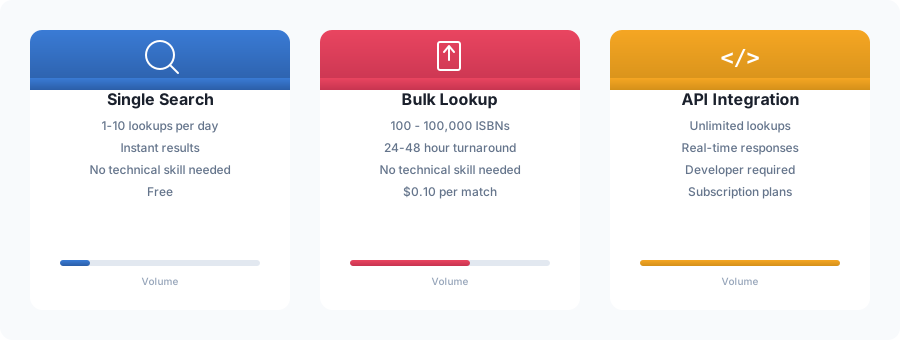
1. Single Search (Web Interface)
Type or scan one ISBN into a search box and get instant results. This is how most people start.
Best for: Quick lookups, verifying individual books, spot-checking data quality.
How it works: Visit BarcodeReport.com and enter an ISBN-13 (or any barcode) into the search bar. Results appear instantly with product name, image, and available metadata.
Limitations: Manual process. Impractical for more than a handful of books at a time.
2. Bulk Lookup (File Upload)
Upload a spreadsheet of ISBNs and receive a file with matched book data for every title found.
Best for: Inventory cataloging, used book acquisitions, data enrichment projects, one-time or periodic processing of hundreds to thousands of ISBNs.
How it works: Prepare a CSV with one ISBN per row. Upload it to BarcodeReport's bulk lookup service. Receive results via email within 24-48 hours.
Limitations: Not real-time. Batch processing means you wait for results.
3. API Integration
Programmatic access that returns book data in real-time via HTTP requests. Build ISBN lookup directly into your applications, scanners, or workflows.
Best for: Automated systems, point-of-sale integration, mobile scanning apps, any workflow that needs instant book data.
How it works: Send a GET request with an ISBN to the BarcodeReport API and receive a JSON response with structured book data. Integrate into any programming language or platform.
Limitations: Requires developer resources for initial integration.
| Method | Volume | Speed | Technical Skill | Cost Model |
|---|---|---|---|---|
| Single search | 1-10/day | Instant | None | Free |
| Bulk lookup | 100-100,000 | 24-48 hours | None | Per ISBN |
| API | Unlimited | Real-time | Developer needed | Subscription |
The ISBN Database Landscape: Key Providers
Several databases serve the ISBN lookup market, each with different strengths, coverage, and pricing models. Understanding the landscape helps you choose the right source for your needs.
BarcodeReport
BarcodeReport takes a different approach: rather than selling access to a book-only database, we provide ISBN lookup as part of a comprehensive barcode database covering all product types — books, groceries, electronics, health products, and more.
Pricing: Free single lookups. Bulk lookup at $0.10 per matched ISBN with no deposit or subscription. API plans available for ongoing integration.
Strengths: No subscription required for bulk jobs. Pay only for successful matches. Supports ISBNs alongside UPC and EAN codes in the same lookup. Fast turnaround on bulk processing.
Best for: Businesses that handle mixed inventory (not just books), one-time catalog projects, and teams that want bulk data without monthly commitments.
ISBNdb
ISBNdb is one of the oldest dedicated book databases, founded in 2001. It claims over 32 million titles with up to 19 data points per book including dimensions, weight, and cover images.
Pricing: $14.95-$74.95/month across Basic, Premium, and Pro tiers. Academic plans available at $5/month.
Strengths: Large dedicated book database, bulk API calls (up to 1,000 ISBNs per request on Premium+), real-time pricing data on Pro plans.
Limitations: Subscription-only access with no free tier. Monthly commitment required even for one-time projects. API rate limits vary by plan (2,000 daily calls on Basic).
Open Library
Open Library is a free, open-source project by the Internet Archive with nearly 30 million titles. Their API provides book data in JSON, YAML, and RDF/XML formats.
Pricing: Free, no API key required for most endpoints.
Strengths: No cost, open data, good for basic bibliographic lookups.
Limitations: No commercial support. Rate limits are informal but enforced. Data completeness varies significantly. No bulk processing tools. No cover images for many titles. Not suitable for high-volume commercial use.
Google Books API
Google's book search API offers access to metadata for over 40 million titles including ratings, reviews, and preview links.
Pricing: Free with quota limits (1,000 requests/day default).
Strengths: Large database, good metadata quality, free tier generous for small projects.
Limitations: Not designed for bulk ISBN lookup. Rate limits restrict commercial-scale usage. No bulk download or batch processing. Data oriented toward consumer discovery rather than inventory management.
WorldCat (OCLC)
The world's largest library catalog with 90+ million entries, operated by the Online Computer Library Center cooperative.
Pricing: Access restricted to recognized organizations. No public API for commercial use.
Strengths: Unmatched depth for academic and library titles, strong multilingual coverage, includes titles published before the ISBN era.
Limitations: Not accessible for most commercial applications. Designed for library-to-library cooperation, not retail or resale workflows.
Provider Comparison at a Glance
| Feature | BarcodeReport | ISBNdb | Open Library | Google Books |
|---|---|---|---|---|
| Database size | 500M+ products (all types) | 32M+ books | 30M+ books | 40M+ books |
| Free single lookup | Yes | No | Yes | Yes |
| Bulk processing | File upload, no subscription | API only (subscription) | No | No |
| API access | Flexible plans | $14.95-$74.95/mo | Free | Free (limited) |
| Pay-per-lookup | Yes ($0.10/match) | No (subscription only) | N/A | N/A |
| Non-book barcodes | Yes (UPC, EAN, ISBN) | No | No | No |
| Commitment | None | Monthly subscription | None | None |
Who Needs ISBN Database Lookup?
ISBN lookup serves a wide range of industries and use cases. Here are the most common.
Used Booksellers and Resellers
The challenge: You've acquired books through estate sales, library deaccessions, thrift stores, or wholesale lots. You have stacks of books with barcodes but need titles, authors, editions, and market data to price and list them.
How ISBN lookup helps: Scan barcodes with a mobile device, send ISBNs through a bulk lookup, or integrate the API into your listing workflow. Get complete book data instantly instead of manually typing each title.
Scale: Used booksellers commonly process 500-5,000 ISBNs per month. High-volume sellers handle 10,000+ monthly.
Libraries and Academic Institutions
The challenge: Cataloging new acquisitions, auditing existing collections, or migrating between library management systems. Each book needs accurate MARC-compatible metadata.
How ISBN lookup helps: Extract ISBNs from your catalog and run a bulk lookup to fill in missing metadata fields — publisher, publication date, subject classifications, page counts. Cross-reference against current databases to catch errors in legacy records.
Scale: Library projects often involve 10,000-100,000+ ISBNs during migrations or audits.
E-Commerce and Marketplace Sellers
The challenge: Listing books on Amazon, eBay, AbeBooks, or your own store requires complete product data: accurate titles, professional descriptions, cover images, and condition-appropriate pricing.
How ISBN lookup helps: Upload your ISBNs through bulk lookup to generate listing-ready data for entire inventory batches. Use the API for real-time lookup during the listing process. For more on optimizing your product listings with barcode data, read our guide on barcode lookup for e-commerce.
Scale: Marketplace sellers need ongoing lookup for new inventory, typically 200-2,000 ISBNs per week.
Publishers and Distributors
The challenge: Managing metadata across multiple editions, formats, and distribution channels. Keeping title information consistent and up-to-date across catalogs.
How ISBN lookup helps: Verify published metadata against database records. Identify where catalog data diverges from what databases are showing. Ensure cover images and descriptions are current.
Scale: Publishers manage thousands of active ISBNs and periodically audit entire backlists.
App Developers and Reading Platforms
The challenge: Building book-related applications — reading trackers, recommendation engines, library apps, bookshelf managers — requires reliable book metadata at scale.
How ISBN lookup helps: Integrate the BarcodeReport API to power barcode scanning features, book search, and catalog enrichment. Return cover images, descriptions, and metadata in real-time when users scan or search for books. Our developer's guide to barcode APIs covers authentication, rate limits, and integration patterns in detail.
Scale: Apps serving active users may need thousands to millions of ISBN lookups per month.
Liquidation and Wholesale Companies
The challenge: Evaluating pallets or truckloads of mixed media inventory. Books, DVDs, games — all with barcodes, all needing identification and valuation.
How ISBN lookup helps: Extract all barcodes from scanned inventory and run them through bulk lookup. BarcodeReport handles ISBNs alongside UPC and EAN codes in the same upload, so you don't need separate tools for books and other products.
Scale: Liquidation projects range from 500 to 50,000+ barcodes per batch.
How to Look Up ISBNs in Bulk
For projects involving more than a handful of books, bulk lookup is the most efficient approach. Here's how to do it with BarcodeReport.
Step 1: Prepare Your ISBN File
Create a CSV, Excel, or text file with one ISBN per row. Both ISBN-10 and ISBN-13 formats are accepted.
9780132350884
9780596007126
9780201633610
9780321125217
9780596517748
0132350882
0596007124
Key preparation tips:
- Don't mix formats unnecessarily — ISBN-13 is preferred, but ISBN-10 works fine
- Remove duplicates before uploading to avoid paying twice for the same title
- Strip hyphens — ISBNs work with or without dashes, but plain digits are safest
- Verify leading zeros — ISBN-10s starting with 0 must keep that zero (format column as Text in Excel)
Step 2: Upload to BarcodeReport
Visit BarcodeReport.com/bulk-lookup and upload your file. The system will:
- Detect and validate each ISBN in your file
- Show a preview with the total count and estimated cost
- Confirm before charging
No account deposit or subscription required. You pay only for ISBNs that return matched book data.
Step 3: Receive Results
Results arrive via email within 24-48 hours (faster for smaller batches). Your output file includes:
- Original ISBN
- Book title and subtitle
- Author(s)
- Publisher
- Publication date
- Binding type
- Page count
- Cover image URL
- Description (when available)
- Category/subject (when available)
Unmatched ISBNs appear in the results with empty fields, so you know exactly which titles need manual attention.
Step 4: Import Into Your System
The CSV output is ready to import into any inventory management system, e-commerce platform, library catalog, or spreadsheet. Common import destinations include:
- Amazon Seller Central — Book listing uploads
- Shopify/WooCommerce — Product catalog imports
- Library systems (Koha, Evergreen) — MARC record enrichment
- Inventory software — Stock identification and cataloging
- Google Sheets/Excel — Analysis and pricing worksheets
Using the API for Real-Time ISBN Lookup
For automated workflows and applications that need instant book data, the BarcodeReport API provides programmatic ISBN lookup. If you're evaluating barcode APIs more broadly, our complete guide to barcode APIs compares generation and lookup APIs across the market.
Quick Start Example
curl "https://barcodereport.com/api/search_barcode?barcode=9780132350068" \
  -H "X-API-Key: YOUR_API_KEY"
{
  "barcode": "9780132350068",
  "old_barcode": "0132350068",
  "title": "Criminology",
  "authors": "Steven E. Barkan",
  "number_of_pages": "656",
  "publish_date": "March 13, 2008",
  "price_currency": "USD",
  "brand": null,
  "category": null,
  "description": null,
  "image_url": null,
  "min_price": null
}
The response is a flat object — every field sits at the top level, and any field
we do not hold for that title comes back as null. Because the lookup matches on
both the current and the superseded code, passing the ISBN-10 0132350068
returns exactly the same record.
API Use Cases for ISBN Lookup
Mobile scanning apps: Users scan a book's barcode with their phone camera. Your app sends the ISBN to the API and displays book details in milliseconds.
Point-of-sale systems: A used bookstore scans a book at the register. The API returns the title, author, and cover image for the receipt and inventory log.
Catalog enrichment pipelines: An automated script reads ISBNs from your database, queries the API, and fills in missing metadata fields overnight.
Price comparison tools: Pull book metadata to display alongside pricing data from multiple marketplaces.
API vs. Bulk: Choosing the Right Approach
| Scenario | Best Method | Why |
|---|---|---|
| One-time inventory catalog | Bulk lookup | No coding required, pay per match |
| Daily new book intake (10-50/day) | Either | Bulk for simplicity, API for automation |
| Real-time scanning app | API | Instant responses required |
| Monthly catalog update (1,000+) | API | Automate the recurring workflow |
| Warehouse pallet assessment | Bulk lookup | Large batch, no urgency |
| E-commerce listing automation | API | Integrate into listing workflow |
Understanding ISBN Data for Different Book Types
ISBN lookup results vary depending on the type of book. Knowing what to expect helps you plan your workflow.
Textbooks and Academic Books
Textbooks are among the most reliably cataloged books in ISBN databases. Publishers meticulously register each edition because:
- Institutional buyers (universities, school districts) require accurate metadata
- Edition tracking matters for curriculum compliance
- ISBNs differ between standard and international editions of the same title
What to watch for: Textbooks frequently have multiple ISBNs for different formats (hardcover, paperback, loose-leaf, ebook, access code bundle). Make sure you're looking up the correct ISBN for your specific copy.
Self-Published and Print-on-Demand Books
The explosion of self-publishing has added millions of ISBNs to the system, but data quality varies.
- Books published through Amazon KDP, IngramSpark, or Lulu typically have ISBNs registered with basic metadata
- Cover images are usually available
- Descriptions and subject categories may be incomplete
- Some self-published authors skip ISBN registration entirely (especially for Kindle-only titles)
Vintage and Out-of-Print Books
Books published before the ISBN system (pre-1970) won't have ISBNs at all. Books from the 1970s-1990s may have ISBN-10 only.
Tips for older books:
- Convert ISBN-10 to ISBN-13 by adding prefix 978 and recalculating the check digit
- Library databases like WorldCat may have better records for older titles
- Cover images are less commonly available for pre-2000 titles
International Editions
ISBNs are assigned by national agencies, so international editions of the same title have different ISBNs. Database coverage varies by region:
- English-speaking markets (US, UK, Canada, Australia): 90%+ coverage
- Western Europe (Germany, France, Spain): 70-85% coverage
- Asia-Pacific (Japan, South Korea, China): 50-70% coverage
- Other regions: 30-60% coverage
For international inventory, consider using BarcodeReport's bulk lookup as a first pass. The output clearly shows which ISBNs returned data and which need alternative sources.
Common ISBN Lookup Challenges (and How to Solve Them)
Leading Zero Truncation
Problem: ISBN-10s starting with 0 (e.g., 0596007124) lose their leading zero when pasted into Excel, becoming 596007124 — which won't match anything.
Solution: Format the column as Text before entering ISBNs. Or use ISBN-13 format exclusively, which always starts with 978 or 979.
Multiple ISBNs for the Same Book
Problem: A single title may have 5-10 different ISBNs across hardcover, paperback, ebook, audiobook, large print, international, and anniversary editions.
Solution: This is expected behavior, not a bug. Each ISBN represents a distinct product. If you need to group editions together, look for matching title + author combinations in your results.
ISBN-10 to ISBN-13 Conversion
Problem: Your inventory has a mix of ISBN-10 and ISBN-13 codes. Some databases only support one format.
Solution: Most lookup services (including BarcodeReport) accept both formats. If you need to standardize, the conversion formula is:
- Drop the ISBN-10 check digit (last character)
- Prepend "978"
- Calculate a new check digit for the 13-digit result
No Match Found
Problem: Your ISBN returns no results from the database.
Possible causes and fixes:
- Typo or scan error: Verify the check digit. An online ISBN validator can confirm the number is structurally valid.
- Pre-ISBN book: Books published before 1970 may not have ISBNs. Check the copyright page.
- Regional publication: The book may be registered in a regional ISBN agency not covered by your lookup source. Try multiple services.
- Very new release: Newly published books take days to weeks to appear in aggregated databases.
- Self-published without ISBN: Some self-published titles only have ASINs (Amazon) without ISBN registration.
Frequently Asked Questions
Related Reading
- The Complete Guide to Barcode Lookup — How barcode lookup works for all product types, not just books
- Barcode API: The Complete Guide — Comparing barcode generation and lookup APIs
- UPC Lookup: How to Search Any Barcode — Step-by-step guide to searching UPC barcodes
Conclusion
ISBN database lookup is essential infrastructure for anyone working with books at scale — booksellers, libraries, developers, publishers, and resellers all depend on reliable, affordable access to book metadata.
Key takeaways:
- ISBNs are part of the EAN-13 barcode system, meaning any barcode lookup service can handle them
- Match rates for published books are high (85-95% for major publishers post-2000)
- Choose single search for quick checks, bulk lookup for batch projects, and API for automated systems
- Dedicated book databases like ISBNdb charge $15-$75/month; BarcodeReport offers per-lookup pricing with no subscription
- Mixed inventory (books + other products) is handled in a single upload with BarcodeReport
Whether you're cataloging a warehouse of used books, building a reading app, or enriching a publisher's backlist, the right ISBN lookup approach depends on your volume, frequency, and technical resources.
Ready to look up ISBNs?
- Search a single ISBN — free, instant results
- Upload ISBNs in bulk — $0.10 per match, no subscription
- Integrate the API — real-time lookup for your applications