
UPC lookup is the process of searching a Universal Product Code to retrieve detailed product information including name, brand, description, images, and pricing. UPC codes are 12-digit numbers found beneath barcodes on retail products in the United States and Canada. To perform a UPC lookup, enter the code into a barcode database, use a mobile scanning app, or integrate a barcode API into your application. This process helps retailers manage inventory, e-commerce sellers create product listings, and consumers compare prices across stores.
Every product on store shelves carries a unique 12-digit identifier that unlocks a wealth of information. That number — the Universal Product Code — connects to product names, descriptions, images, and pricing data stored in databases around the world.
Whether you're an e-commerce seller building product listings, an inventory manager identifying items in your warehouse, or a developer integrating product data into an application, knowing how to look up UPC codes efficiently saves hours of manual research.
Barcodes are scanned over 10 billion times daily worldwide, and 90% of major retailers rely on this system for inventory and sales. This guide covers everything you need to know about UPC lookup — what it is, how to do it using different methods, and how to choose the right approach for your specific needs.
What Is a UPC Code?
A Universal Product Code (UPC) is a 12-digit number that uniquely identifies retail products. Introduced on June 26, 1974 — when a pack of Wrigley's Juicy Fruit gum became the first item ever scanned at a Marsh Supermarket in Troy, Ohio — UPCs have become the foundation of modern retail.
The 12 digits break down into four components:
- Digit 1 (Number System): Indicates the product type. Most retail items use 0, 1, 6, 7, or 8. The number 2 indicates variable-weight items like produce, and 3 is for pharmaceuticals.
- Digits 2-6 (Company Prefix): A unique identifier assigned to the manufacturer or brand owner.
- Digits 7-11 (Product Number): Assigned by the manufacturer to identify the specific product, including variations like size or color.
- Digit 12 (Check Digit): A mathematical verification calculated using the Modulo-10 algorithm to detect scanning errors.
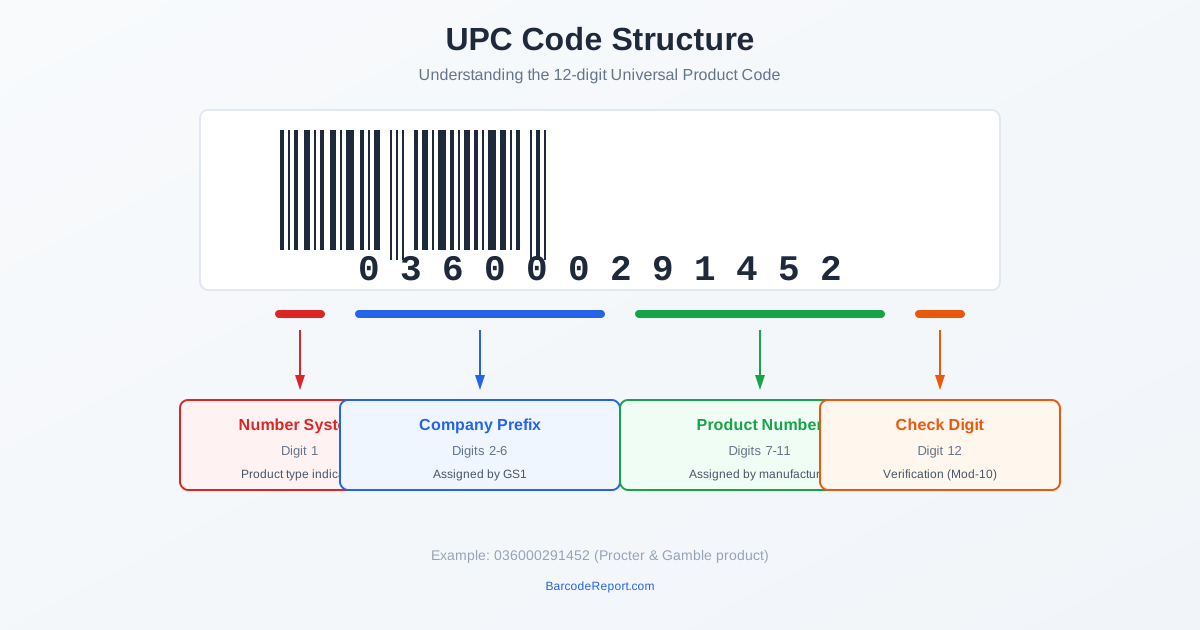
UPC-A is the standard 12-digit format used in North America. UPC-E is a compressed 8-digit version for small products where the full barcode won't fit.
The UPC system is administered by an international standards organization with 118 member organizations operating in over 90 countries. Today, more than 680 million unique UPC/EAN numbers are cataloged in major databases.
How UPC Lookup Works
When you enter a UPC code into a lookup tool, the service searches its database for a matching entry. If found, it returns the associated product information that manufacturers, retailers, and data providers have uploaded.
A typical UPC lookup returns:
- Product name and brand
- Description and specifications
- Category classification
- Product images (multiple sizes)
- Dimensions and weight
- MSRP or pricing data (when available)
The data comes from multiple sources: manufacturers who register their products, retailers who catalog inventory, and in some cases, crowdsourced contributions. Database quality varies — official sources and commercial APIs with verified data tend to be most accurate.
Not every UPC will return results. Products might be too new (not yet uploaded to databases), regional (limited distribution), discontinued, or from manufacturers who haven't shared their data. When a lookup fails, trying multiple databases often helps.
How to Look Up a UPC Code
There are four main methods to perform a UPC lookup, each suited to different use cases and volumes.
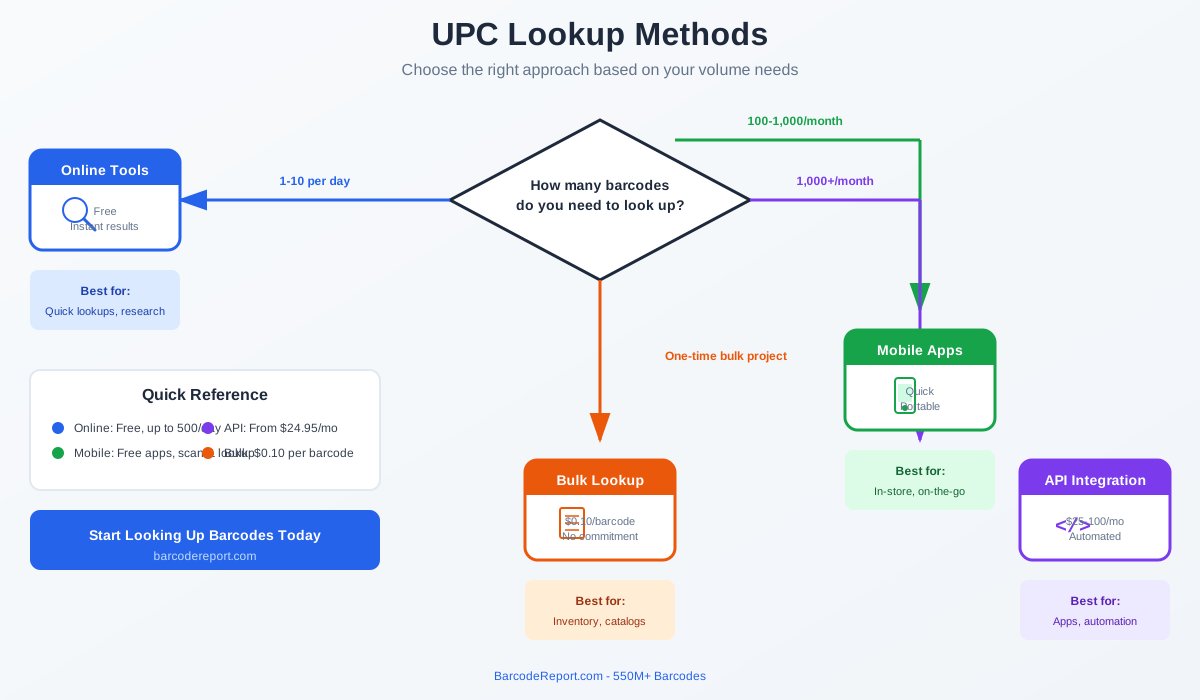
Method 1: Online UPC Lookup Tools
The simplest approach for occasional lookups. Enter the 12-digit code into a search field on a UPC database website and get instant results.
Best for: Single lookups, quick product identification, verifying barcode data
How it works:
- Navigate to a UPC lookup website
- Enter the 12-digit code (or 13-digit EAN)
- View product information instantly
Most services offer free lookups with daily limits (typically 100-500 per day). This method requires no technical setup but doesn't scale for high-volume needs.
Method 2: Mobile Barcode Scanner Apps
Use your smartphone camera to scan barcodes directly and retrieve product information in real-time.
Best for: In-store price comparisons, quick identification, inventory audits on the go
Popular apps include QR & Barcode Scanner (500+ million downloads) and dedicated inventory management apps like Orca Scan (used by 50,000+ organizations in 165+ countries).
Most mobile apps are free with ads, or offer ad-free versions for a small fee. They're convenient but limited for processing large volumes of products.
Method 3: Barcode API Integration
For developers and businesses that need programmatic access, a barcode API provides real-time lookups through HTTP requests.
Best for: E-commerce platforms, inventory systems, mobile app development, automated workflows
How it works:
- Sign up for an API service and get your API key
- Send HTTP requests with the UPC code
- Receive JSON responses with product data
- Integrate into your application or workflow
API plans typically start at $25-50/month for 5,000-10,000 lookups. Response times are fast (often under one second), and most services support batch requests for processing multiple codes at once.
Method 4: Bulk Barcode Lookup
When you need product data for thousands of barcodes without API integration, bulk lookup services let you upload a spreadsheet and receive results.
Best for: One-time inventory projects, catalog building, data enrichment, warehouse receiving
How it works:
- Prepare a CSV or Excel file with your UPC codes
- Upload to the bulk lookup service
- Receive a results file with product data for each code
Bulk services typically charge per barcode (around $0.10 each) with no monthly commitment. This is ideal for one-time projects where you need to identify many products without building a technical integration.
UPC Lookup for Major Retailers
Sometimes you need to find the UPC for a product listed on a major retail website. Here's how to locate UPCs on the three largest online retailers.
Finding UPCs on Amazon
Amazon uses its own identifier called ASIN (Amazon Standard Identification Number) instead of displaying UPCs directly. To find a product's UPC:
- Search for the product on Amazon
- Scroll to the "Product Information" or "Technical Details" section
- Look for "UPC" in the listed specifications
- If not shown, you can use an ASIN-to-UPC converter tool
When sellers list products on Amazon, they provide the UPC, which Amazon uses to create or match an existing ASIN. Multiple sellers of the same product share the same ASIN.
Important: Amazon requires registered UPCs since May 2016. Ensure your barcodes come from a legitimate source, as listings can be suppressed for invalid or unverified UPCs.
Finding UPCs on Walmart
Walmart displays UPCs in the product details section:
- Open the product page on Walmart.com
- Scroll to "Specifications" or "Product Details"
- Find the UPC listed among the product attributes
- Alternatively, right-click and "View Page Source," then search for "UPC"
Walmart requires GTINs/UPCs for all marketplace sellers and mandates that codes be purchased from an authorized source.
Finding UPCs on Target
Target makes UPCs accessible in product listings:
- Navigate to the product page on Target.com
- Scroll to the "Specifications" section
- Locate the UPC in the product details
- Use Ctrl+F (or Cmd+F on Mac) and search "UPC" if needed
UPC vs SKU: What's the Difference?
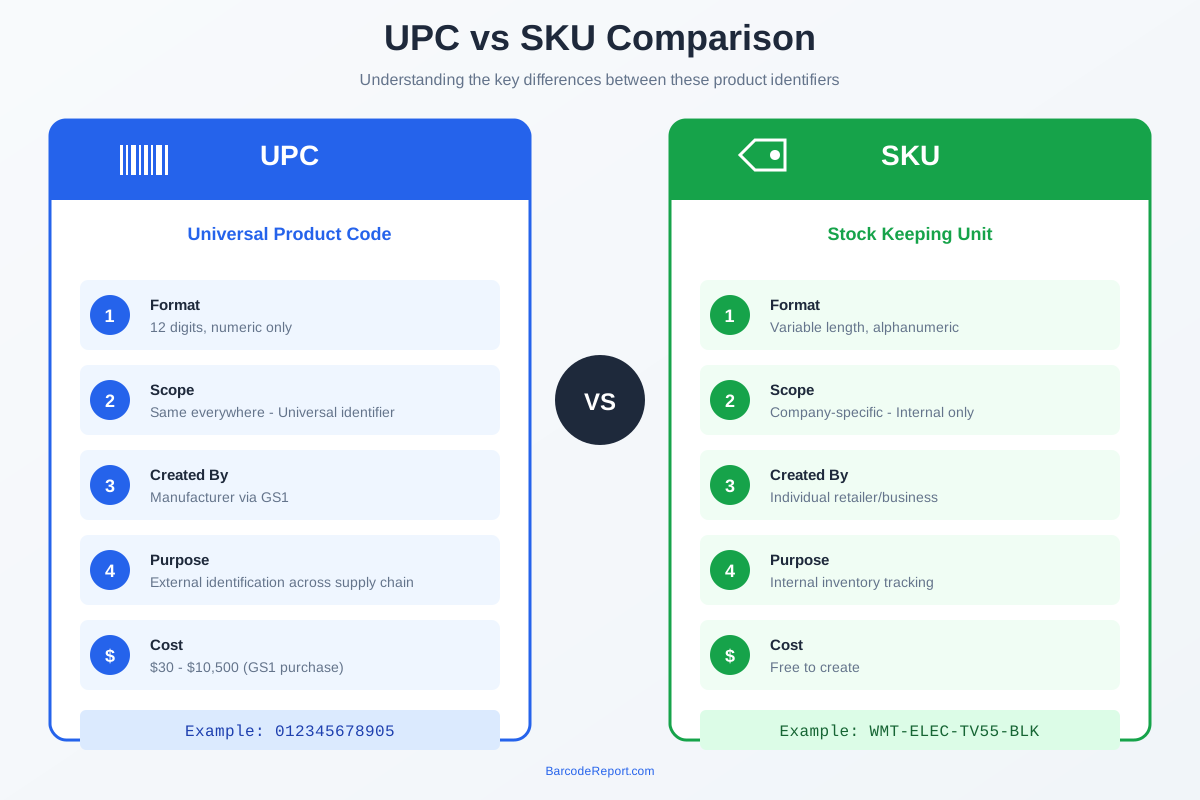
Two identification systems commonly confuse people: UPC and SKU. Understanding the difference helps you use each appropriately.
| Feature | UPC | SKU |
|---|---|---|
| Created by | Manufacturer | Individual retailer/business |
| Scope | Universal — same everywhere | Internal — unique to each company |
| Format | 12 digits, numeric only | Variable length, alphanumeric |
| Purpose | External identification | Internal inventory tracking |
| Cost | $30-$10,500+ | Free to create |
UPCs are universal identifiers that stay the same regardless of where a product is sold. The same tube of toothpaste has the same UPC at Walmart, Target, and your local grocery store.
SKUs (Stock Keeping Units) are internal codes that businesses create for their own inventory management. The same toothpaste might have different SKUs at different retailers based on their internal organization systems.
Best practice: Use both. UPCs handle external communication with suppliers, marketplaces, and across your supply chain. SKUs give you flexibility for internal organization, warehouse locations, and detailed inventory tracking.
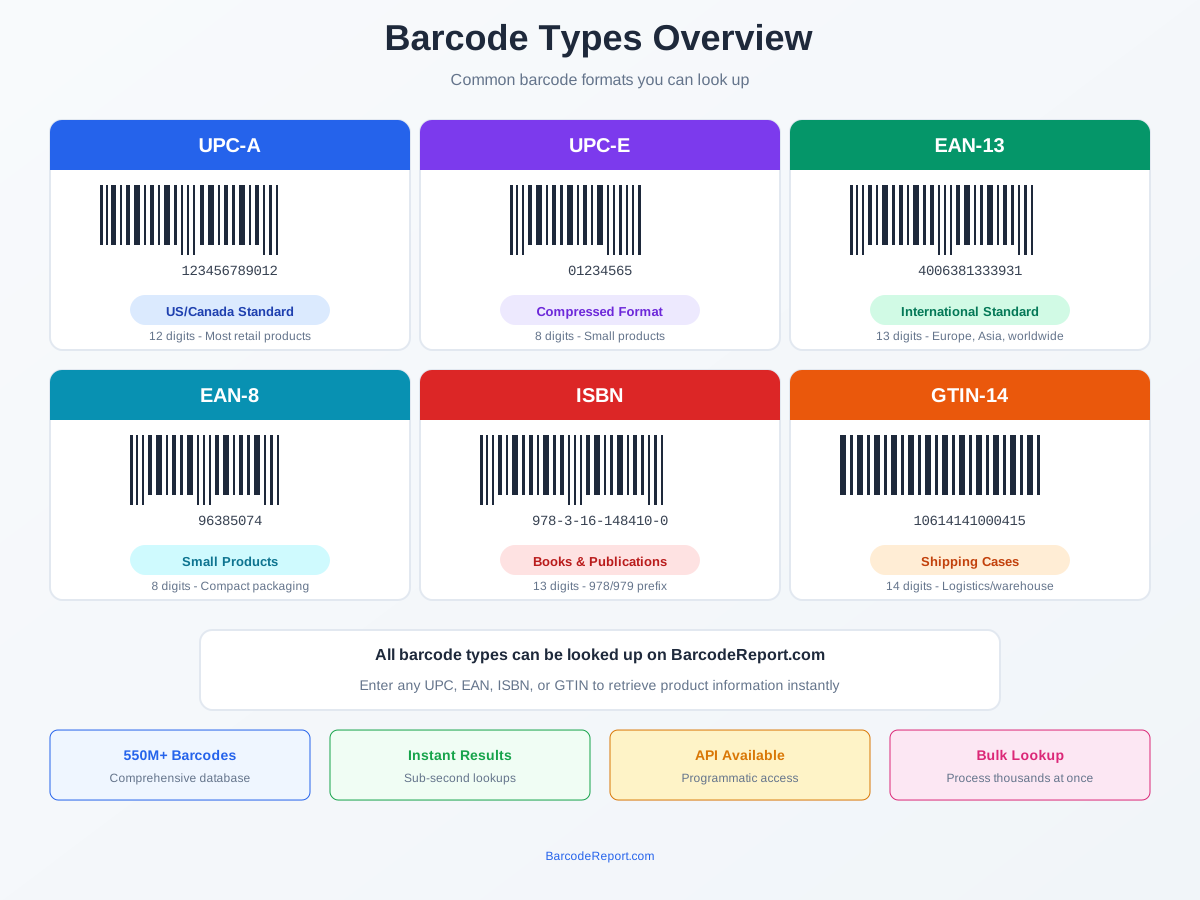
Types of Barcodes You Can Look Up
While UPC-A is the most common format in North America, lookup services support multiple barcode types:
UPC-A (12 digits): Standard retail format in the US and Canada. The default for most consumer products.
UPC-E (8 digits): Compressed version for small items. Removes zeros from the manufacturer and product codes to save space.
EAN-13 (13 digits): International standard used in Europe, Asia, and most countries outside North America. Every UPC-A can convert to EAN-13 by adding a leading zero.
EAN-8 (8 digits): Compact international format for very small products like candy or cosmetics.
ISBN-10/13: International Standard Book Number for books and publications. Encoded as EAN-13 barcodes with a specific prefix.
GTIN-14: Used on shipping cases and multipacks. Contains 14 digits for logistics and warehouse applications.
Most modern lookup services accept any of these formats and normalize them for database matching.
Who Uses UPC Lookup?
UPC lookup serves diverse users across the retail and supply chain ecosystem.
E-commerce Sellers: Quickly populate product listings with accurate information. Marketplaces like Amazon, eBay, and Walmart require GTINs, making UPC lookup essential for multi-channel selling.
Retailers and Inventory Managers: Identify products during receiving, track stock levels, and enrich product databases. UPC lookup enables accurate inventory across multiple locations.
Developers and Tech Companies: Build barcode scanning apps, power product search features, and integrate product data into platforms. API access enables programmatic lookup at scale.
Supply Chain Professionals: Track products through the supply chain, verify shipments, and maintain data accuracy across trading partners.
Consumers: Compare prices while shopping, research products before purchase, and verify product authenticity.
Choosing a UPC Lookup Service
Selecting the right lookup service depends on your volume, technical requirements, and budget.
For occasional single lookups (fewer than 100/day): Free online tools work well. No subscription needed, but limited features.
For regular lookups (1,000-10,000/month): API subscriptions provide reliable access with better data quality. Plans typically start around $25-50/month.
For one-time bulk projects: Bulk lookup services let you process thousands of codes without monthly commitments. Pay per barcode (around $0.10 each).
For enterprise applications: Commercial APIs with SLAs, dedicated support, and high-volume pricing. Response times under 15ms and 99.9%+ uptime.
Key factors to evaluate:
- Database size: Look for services with 500 million+ barcodes
- Data accuracy: Verified sources outperform crowd-sourced data
- Coverage: Ensure support for international EAN codes if needed
- Response time: Critical for real-time applications
- Bulk options: Important for large data projects
BarcodeReport.com offers 500M+ barcodes with flexible options — API plans starting at $24.95/month for 10,000 lookups, or bulk processing at $0.10 per barcode for one-time projects.
Frequently Asked Questions
Is there a free UPC lookup available?
Yes. BarcodeReport.com offers free single UPC lookups with no account required. Simply enter any barcode on our homepage to instantly retrieve product information. Free tiers typically allow 100-500 lookups per day. For bulk or API access with higher volumes, paid plans are required.
What if my UPC code isn't found in a database?
Not all products appear in every database. Common reasons include: the product is too new (recently assigned, not yet uploaded), the manufacturer hasn't shared product data, the item has limited regional distribution, or the product is discontinued. Try multiple lookup services or verify the UPC is correctly formatted with a valid check digit.
Can I look up multiple UPCs at once?
Yes. Our bulk lookup tool accepts CSV or Excel uploads with thousands of barcodes and returns product data for all matches. Upload your file and receive results for $0.10 per barcode with no monthly commitment. Most commercial APIs also support batch requests where you submit multiple codes in a single call. Bulk processing is significantly more efficient than individual lookups for large projects.
What's the difference between UPC and barcode?
The barcode is the visual pattern of black lines and white spaces you see on product packaging. The UPC is the 12-digit number encoded within that pattern. When a scanner reads the barcode, it decodes those lines into the UPC number, which then gets looked up in a database for product information.
How accurate is UPC lookup data?
Accuracy varies significantly by source. Official databases and commercial APIs with verified data sources offer the highest accuracy (95-99%). Crowd-sourced databases where users submit information tend to have more errors and gaps. For critical applications like marketplace listings or inventory systems, use verified sources and cross-reference important data.
Do I need a UPC for my own product?
Yes, if you plan to sell through major marketplaces (Amazon, Walmart, eBay) or traditional retail stores. You have two options: rent from GS1 for $30 per code annually (plus $250+ for a company prefix), or buy and own GS1-registered codes from UPCs.com for just $10 per code with bulk discounts available. Owned codes have no renewal fees and work on all major marketplaces. Some marketplaces offer GTIN exemptions for private-label or handmade items, but having a proper UPC ensures maximum compatibility.
Conclusion
UPC lookup transforms 12-digit codes into comprehensive product information, enabling efficient inventory management, accurate marketplace listings, and streamlined retail operations.
Key takeaways:
- UPC lookup retrieves product name, brand, description, images, and more from barcode databases
- Choose your method based on volume: online tools for occasional use, API for regular needs, bulk upload for large projects
- Database size and accuracy matter — look for services with 500M+ verified barcodes
- UPCs are universal identifiers; SKUs are company-specific. Use both for complete inventory control
- Major marketplaces require valid UPCs — purchase from authorized sources to avoid listing issues
BarcodeReport.com maintains a database of 500M+ barcodes with options for every use case. Try a free lookup to see the data quality, explore our barcode API for development projects, or use bulk lookup for one-time data enrichment.
The right UPC lookup solution saves hours of manual product research and ensures accurate data across your operations.\n\nLooking up books instead of retail products? ISBNs work just like UPCs but carry richer bibliographic data. See our ISBN database lookup guide for book-specific workflows, bulk processing, and API integration.


